



Guidelines for speeding up your website
Once you have tested your website’s speed, you can start optimizing it. There are various ways to make your website faster; here is a list of the most effective ones.
- Use a content delivery network (CDN)
A content delivery network is a collection of web servers distributed across different geographical locations to deliver web content to end users according to their location. When you host a website on a single server, all user requests go to the same hardware. This increases the time needed to process each request. Loading time also increases when users are physically far from the server. With a content delivery network (CDN), user requests are directed to the nearest server. As a result, content reaches users faster and the website runs more quickly: its loading speed improves. This is a relatively expensive but highly effective way to optimize a website’s load time.
- Move your website to a better host
Choose one of these three types of hosting for your website:
- Shared hosting
- Virtual private server (VPS) hosting
- Dedicated server
The most popular type of hosting worldwide is shared hosting because it is the cheapest way to get your site online quickly and inexpensively. Choosing a fast web host is essential for better website optimization. With shared hosting, you share the central processing unit (CPU), disk space, and random-access memory (RAM) with other sites using the same server. This is why shared hosting does not offer the speed of a dedicated server or a virtual private server (VPS).
In other words, virtual private servers (VPS) and dedicated servers are much faster. A VPS uses several servers to distribute content. With a VPS, you share the server for your users while also having your own portion of a virtual server, where your settings do not affect the customers of other websites. If your website has moderate traffic or you have an online store with traffic spikes during certain periods or special occasions, a VPS will be a suitable host for you.
The most expensive hosting option is a dedicated server, which can be your own physical server. In this case, you pay to rent the server and hire a system administrator to maintain it.
Another approach is to rent dedicated cloud resources from AWS, Microsoft Azure, Google, or other public cloud providers. Both approaches can also be combined in a hybrid cloud (a cloud computing environment that combines on-premises, private cloud, and third-party cloud services, with coordination between these platforms). With dedicated servers, all resources belong exclusively to you and you have full control over them. Cloud infrastructure can also provide unlimited, on-demand scalability with the help of additional packages.
Serverless architecture is another option that generally removes the steps involved in setting up and maintaining a server.

- Optimize your website’s image sizes
Everyone loves eye-catching images, and for successful online stores they have become essential. Numerous photos, images, and graphics on product pages help customers connect with products and encourage them to buy. The downside of images is that they are usually large files that slow down the website.
The best way to reduce image size without compromising quality is to compress images using tools such as ImageOptim, JPEGmini, or Kraken. This may take some time, but it is worth it. Another way to reduce image size is to use responsive images in HTML with the <secret> and <size> tags, which adjust image size to the characteristics of the user’s display.

- Reduce the number of plugins
Plugins are common components of websites. They add specific features provided by third parties. Unfortunately, the more plugins you install, the more resources are needed to run them. As a result, the website slows down, and security problems may also arise. Over time, the number of plugins grows even though some may no longer be used. We recommend reviewing all installed plugins and deleting unnecessary ones.
First, run performance tests on your page to identify which plugins slow down your website. Website speed depends not only on the number of installed plugins but also on their quality. Try to avoid plugins that load many scripts and styles or generate numerous database queries. The best solution is to keep only essential plugins and make sure they stay up to date.

- Minimize the number of JavaScript and CSS files
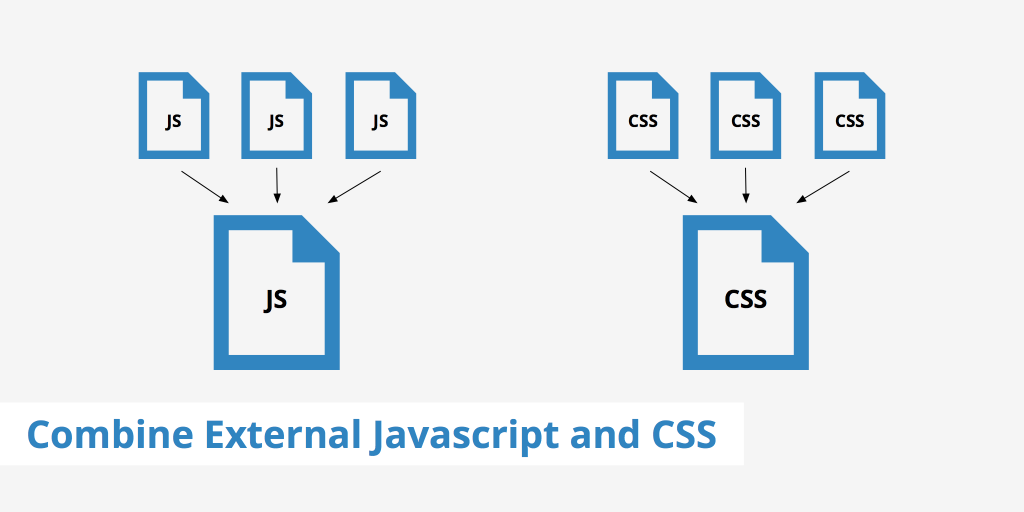
If your website contains many JavaScript and CSS files, it generates numerous HTTP requests when visitors want to access particular files. The visitor’s browser processes these requests individually, slowing down the website. Reducing the number of JavaScript and CSS files will undoubtedly increase your website’s speed. Try grouping all JavaScript files together and doing the same with all CSS files. This reduces the total number of HTTP requests. Many tools can quickly minify HTML, CSS, and JavaScript files. Examples include WillPeavy, Script Minifier, and Grunt.
- Use website caching
When many users access a website page simultaneously, servers slow down and need more time to deliver the page to each user. Caching stores the current version of your website on the host and serves that version until your website is updated. This means the web page is not generated repeatedly for every user. In other words, a cached web page does not need to make database requests each time.
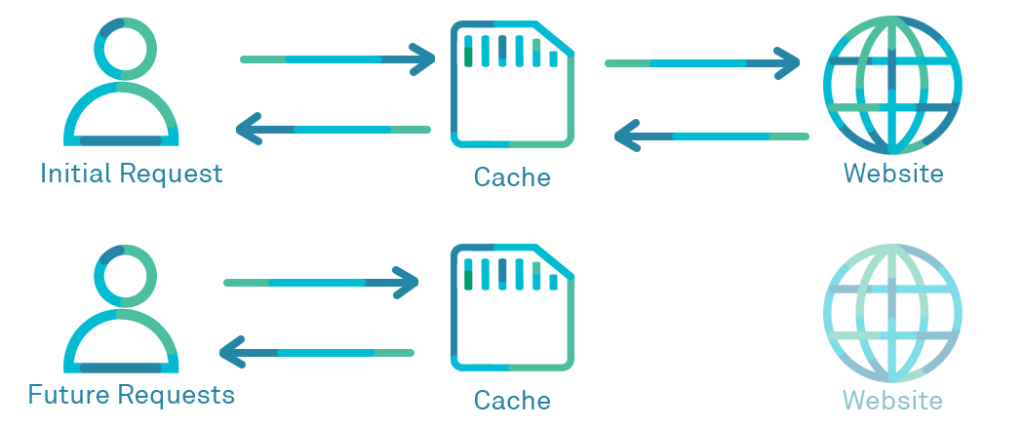
Website caching approaches depend on the platform on which your website was developed. For WordPress, for example, you can use W3 Total Cache or W3 Super Cache. If you use a VPS or dedicated server, you can also configure caching in your general settings. With a shared server, website caching is usually unavailable.

- Implement Gzip compression
Gzip compression is an effective way to reduce file sizes. It minimizes HTTP requests and reduces server response time. Gzip compresses files before sending them to the browser. When the user wants to download or use a file, the browser decompresses it and displays its contents. This method can work with all your website’s files. You can enable Gzip on your website by adding a few lines of code or using a tool called gzip.
- Optimize the database in your CMS
Database optimization is an effective way to improve website performance. If you use a content management system (CMS) filled with complex plugins, the database grows and your website runs more slowly. For example, the WordPress CMS stores comments, blog posts, and other information that takes up considerable data space. Every CMS requires its own optimization measures and also has a range of dedicated plugins. For WordPress, for example, you can consider WP-Optimize.
- Reduce the use of web fonts
Web fonts have become very popular in website design. Unfortunately, they negatively affect page rendering speed. Web fonts add extra HTTP requests to external resources. The following measures will help you reduce web-font traffic:
- Use modern WOFF2 formats for modern browsers.
- Include only the characters used on the site.
- Select only the styles you need.
- Identify 404 errors
A 404 error, which you have probably seen many times, means “the requested page was not found.” The host sends this message to browsers or search engines when the requested page’s accessible content no longer exists. You can use error-detection tools and plugins to identify and correct 404 errors. As mentioned, extra plugins can adversely affect your website’s speed, so we recommend checking the source through external error-detection tools. Examples include Xenu’s Link Sleuth, Google Webmaster Tools (GWT), and the 404 Redirected Plugin for WordPress.
Once you have identified all 404 errors, evaluate the traffic they generate. If these dead links no longer attract visits and therefore never consume your server resources, you can leave them as they are. If these pages still receive some traffic, set up redirects for external links and correct the addresses of internal links.
- Reduce redirects
Website redirects create additional HTTP requests that negatively affect performance. We recommend minimizing them or removing them entirely. First, identify all redirects on your pages by running a site scan. You can use Screaming Frog to find redirects quickly. Then check whether they serve a necessary purpose and keep only the important ones.
- Use prefetching techniques
Prefetching involves reading and executing instructions that you know a user will follow when they enter your website. This technique is relatively common. If you can predict user actions and, for example, preload some content or links, you are putting it to good use and improving site loading speed. Modern browsers usually provide prefetching by default because they take user behavior patterns into account. However, UX specialists and engineers understand user behavior and give browsers the necessary advance hints for prefetching.
Conclusion
Today, a typical user expects web pages to load in less than three seconds. If you do not address delays, you will lose a large amount of website traffic and, consequently, revenue.We therefore recommend a simple yet effective approach to optimizing website speed:
- Review and evaluate the key factors behind your website’s success in terms of visitor-to-customer conversion rate, website visibility, and usability for visitors.
- Test your website’s current speed and prioritize the pages and features that need the most attention according to these three factors.
- Start your optimization with the most significant causes of slow loading, and focus on the pages where you can achieve the greatest improvements in website loading speed.