


Beautiful, coordinated Highlight covers can make a considerable difference in making your profile look more professional and attractive. Highlight covers are the images used to represent each group of saved Stories, helping communicate the Highlight’s subject and content more clearly. Stay with us to the end of this article to learn how to create Instagram Highlight covers.
The Importance of Attractive Highlight Covers

Attractive Highlight covers play an important role on Instagram. They not only give your profile a professional, appealing appearance but also help followers easily find the topics that interest them.
Why Is It Important to Use Instagram Highlight Covers?
Instagram provides users with various tools and features. Highlights is one such feature, allowing users to keep Stories for longer than 24 hours and save them in different categories. Highlight covers, the display images for each group of Stories, play an important role in the appearance and professionalism of an Instagram profile. Reasons to use Instagram covers include:
-
Attracting More Attention
Beautiful, engaging covers can catch profile visitors’ attention and encourage them to view your Highlights. When visitors arrive at your profile, Highlight display images are among the first things they notice. Using appealing, relevant images can therefore make a significant difference in attracting an audience.
-
Improving Visual Consistency and Cohesion
Using coordinated covers with a particular color palette and style can give your profile greater consistency and coherence. This visual harmony not only improves its appearance but also provides visitors with a better user experience.
-
Representing a Personal or Business Brand
Social media services such as Instagram sometimes offer so many possibilities that they can also support your business. If you use Instagram for a business or personal brand, Highlight covers can help express your brand identity and communicate a specific message to viewers. Using your logo, brand colors and related graphic elements can leave a positive impression on your audience.
Steps for Creating Instagram Highlight Covers
You can use various tools to create attractive Highlight covers. In this section, we look at the steps involved using graphic design programs and mobile apps.
- The first step is choosing an appropriate tool. You can use professional design software such as Adobe Photoshop or Illustrator. Mobile apps such as Canva, Over and PicsArt are also options for creating Highlight covers.
- Before you begin designing, decide on your desired theme and style. These might include specific colors, patterns, icons and fonts. For example, if your profile represents a particular brand, use colors and graphic elements associated with that brand.
- The source recommends square Instagram Highlight cover images, using 1080 × 1080 pixels as a standard design size. This size helps produce sharp, high-quality images.
- Now that you have chosen your tool and theme, you can begin designing your Highlight cover.
- Saving and Uploading a Highlight Cover
After designing your Highlight cover, save it as a JPEG or PNG file. Next, upload the image to Instagram as your Highlight cover. Follow these steps:
Open your Instagram profile. Select the Highlight you want to change. Choose “Edit Highlight,” then “Edit Cover.” Select your new cover image from your gallery and make the necessary adjustments.
Important Tips for Creating Instagram Highlight Covers
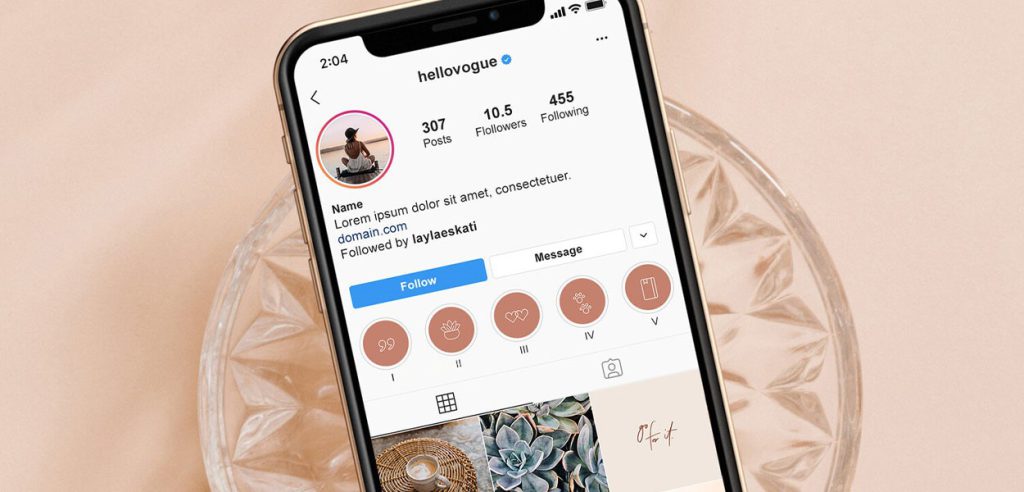
Attractive, professional Highlight covers can help draw your audience’s attention and strengthen your brand on Instagram. If you work in digital marketing, the following tips can help you create Instagram Highlight covers.
- Simplicity and clarity: Images should be simple and clear. Avoid excessive detail so that the cover’s message comes across effectively.
- Using icons: Icons are useful for showing the subject of each Highlight. Choose icons related to each group of Stories. For example, for a travel Highlight, you could use an airplane or suitcase icon.
- Choosing coordinated colors: Colors play an important role in a cover’s visual appeal. Use colors that work well together and suit your profile’s theme.
Using Online Tools to Create Instagram Highlight Covers
In addition to professional design software, online tools and mobile apps are useful options for creating Instagram Highlight covers. In this section, we look at several popular tools:
1. Canva
Canva is one of the most popular online graphic design tools, offering many features for creating Instagram Highlight covers. To use Canva, follow these steps:
- Visit the Canva website and create an account.
- In the “Templates” section, select “Instagram Story Highlight Cover.”
- Choose a ready-made template or create a new design from scratch.
- Add elements such as icons, text and colors to your design.
- Save your design in an appropriate format and upload it to Instagram as a Highlight cover.
2. Over
The source introduces Over as a mobile app offering a range of features for designing Instagram Highlight covers and describes it as available for iOS and Android. With Over, you can use various templates and tools to create Highlight covers.
3. PicsArt
PicsArt is another popular image-editing and design app with a range of features for creating Instagram Highlight covers. The source describes it as available for iOS and Android, with various tools that can be used to create covers.
Conclusion
Attractive, coordinated Highlight covers can make your Instagram profile considerably more appealing. Given the visual importance of profiles on this social network, creating and using suitable covers can help you present a more professional, engaging profile. In this article, we explored why Highlight covers matter and how to create them using different tools. By following these tips and using the tools introduced here, you can create attractive, distinctive Highlight covers for your Instagram profile.